
Chrome Tools Weren't Built for Real Estate Brokers

The broker workflow no off-the-shelf extension planned for
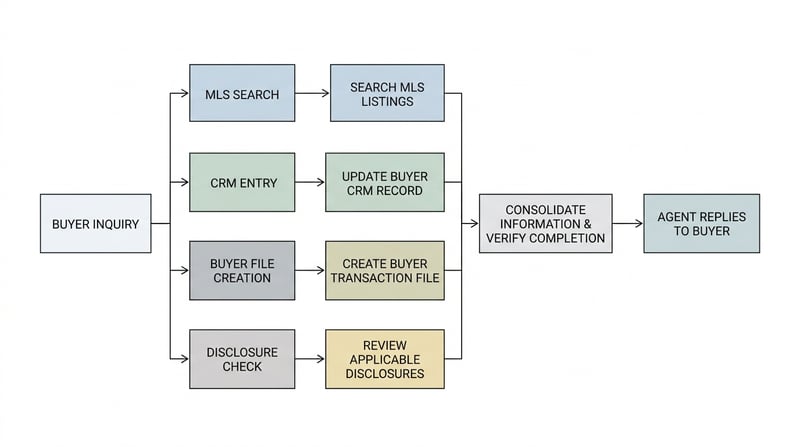
A broker opens eleven tabs before the coffee's even cold. The MLS sits in one. The CRM in another. Then Gmail, a title portal, a state disclosure checklist, two public listing sites.
None of them talk to each other. Not really.
That's the daily reality. And yet most agents keep bolting on consumer productivity add-ons built for a marketing manager, not someone juggling three closings at once.
Look, the individual steps aren't hard.
Copy an address. Check the seller's transaction history. Drop it in the CRM. Flag whatever triggers a disclosure.
Fine, until you're doing it ninety times a week across systems that weren't built to share so much as a clipboard, let alone a login.
Picture a plain Tuesday. A buyer texts at 7:40am about a listing that hit overnight.
The agent opens the MLS, finds it, and needs three things at once: the full property record, the buyer's file, and whether this street has a known disclosure problem.
Each one lives in a different tool behind a different login. So the agent alt-tabs, copies, pastes, re-types, four separate times, before answering a text that should've taken thirty seconds.
Multiply that by a dozen active buyers and the morning's gone. Not to selling. To clerical friction no Chrome Web Store add-on was ever going to fix.
Off-the-shelf tools assume your data lives somewhere tidy and public. Broker data doesn't behave like that.
It hides behind a Matrix or Paragon login. It arrives through a RESO Web API feed with field names only a database admin could love. Or it sits in a CRM property your brokerage decided, for reasons lost to time, to call 'Warm-Reno-Buyer.'
No marketplace extension can guess that. Nobody told it to.
Consumer extensions chase breadth. One tool, a million users, zero vertical assumptions.
That breadth is exactly why they can't help a broker. They don't know listing statuses from license rules from how a specific board formats a parcel number.
Brokers don't control the systems they depend on, either.
An association owns the MLS. A vendor sets the CRM's field schema. Email lives with Google or Microsoft. A generic tool sits on top of all of it, with no special access to any of it.
Here's my honest disagreement with the usual pitch for these tools: they're marketed as time-savers for solo agents, but the pain scales worse for teams. A solo agent absorbs the friction. A fifteen-person team multiplies it by fifteen people re-keying the same fields by hand.
According to the National Association of Realtors technology research, agents rank tech fragmentation and duplicate data entry among their sharpest daily frustrations, though the exact ordering shifts year to year.
Speed decides deals in this market. The agent who answers with the full picture first usually wins the client, and clerical drag is what's standing in the way.
Where generic tools break: MLS logins, CRM fields, compliance data
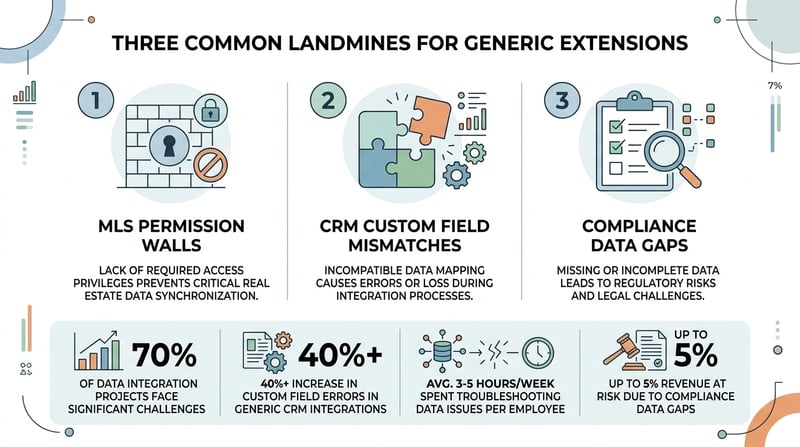
Install a popular scraping extension on your MLS and watch it flail.
It stalls at the login wall. Or it grabs the wrong fields, because it doesn't know 'Active Under Contract' and 'Pending' mean two different things to a buyer's agent.
Most generic extensions run as content scripts, with permissions scoped to whatever domains the developer whitelisted at build time.
Read the Chrome for Developers guide to Manifest V3 and the limits are spelled out plainly.
An extension only reaches pages and APIs it declared up front. It won't slip into a system handing out proprietary session tokens it was never issued.
So here's the part nobody selling a productivity pack says out loud.
A generic tool physically can't read your brokerage's back office. Not won't. Can't.
The browser's own permission model shuts that door before the extension finishes loading.
Think about what 'read my MLS' actually asks software to do.
Authenticate as you. Understand a data schema the MLS never published openly. Fetch specific fields without tripping rate limits or terms-of-service alarms.
A marketplace extension has none of that context. It was written for a generic web page, not a gated real estate platform.
The RESO Web API improved some of this.
RESO, the Real Estate Standards Organization, defined a common data dictionary so tools can request listing fields in a predictable shape. Plenty of MLSs expose it now.
But access still needs credentials and approval. A random extension doesn't get a key just because it asked politely.
CRM customization is the second landmine.
Two brokerages on the same CRM can look nothing alike underneath. Custom fields. Custom stages. Custom automations firing the instant a record changes.
Follow Up Boss, kvCORE, and a Salesforce org that three brokerages each customized will store 'lead source' under three different internal keys.
A one-size extension writes to the wrong field, or clobbers a note somebody spent twenty minutes typing. Now you're cleaning up after the tool that promised to save you time.
Compliance is where this gets sharp.
A missed disclosure. An unlicensed assistant sending a message only a licensed agent may legally send. Either one can become a license-board complaint.
Generic add-ons don't know your state's rules. They won't check a required form. They can't flag a text that crosses a regulated line.
Here's my actual disagreement with how this gets talked about: most write-ups treat this as a data-quality problem. It's a liability problem. A tool that ignores compliance rules doesn't just create messy records, it sits in your browser as legal exposure, one bad click from a complaint.
None of this makes generic extensions useless. For email templates or calendar tricks, they're fine. Point them at your MLS and CRM core, and they hit a wall.
What a chrome extension for real estate brokers can actually automate
Build the thing on purpose and the scope narrows fast, down to jobs that hand back an hour a day.
A scoped chrome extension for real estate brokers does a handful of dull tasks better than any human doing them at 9pm.
Boring on purpose. That's the whole point.
In practice, the automations worth paying for look like this:
- Read a listing on Bright MLS or CRMLS and write clean fields straight into Follow Up Boss. No copy-paste, no fat-fingered typos.
- Cross-check a new prospect against your pipeline so nobody double-works a lead a teammate already owns.
- Flag records missing a required disclosure or an expired license note before they reach a client.
- Grab a public tax or ownership record and attach it to the contact, source URL saved for the file.
- Log the timestamp and listing URL automatically, so nobody's guessing later which version was current.
- Surface duplicate contacts across team members before a call gets made twice.
Data entry is the obvious first win. A listing record on Bright MLS carries dozens of fields. A human copies a handful into the CRM and skips the rest.
A scoped extension copies the ones you chose, cleanly, in the right format, with the listing URL and date stamped on the record.
De-duplication is the second win. On a team of ten, the same lead surfaces twice more often than anyone likes to admit.
Two agents call the same person. It looks unprofessional, and it burns calls you don't get back.
A tool that checks the CRM the instant a profile loads kills that overlap before it embarrasses anybody.
Compliance checks are the win nobody brags about but everybody needs.
A build that flags a missing disclosure, an expired license field, or a message drafted by the wrong role saves a fine that dwarfs the cost of the tool.
Notice what's missing from that list. No chatbot. No generative gimmick.
Value here is accuracy and speed on tasks brokers already do, handled by software that finally understands the fields.
A generic add-on versus a purpose-built one is the gap between a house key and a master key cut for your building.
One opens a door. The other was made for your locks.
This is the same trap UnoiaTech dug into on how sales teams still lose hours to manual data entry.
It rhymes with the case for handing software the repetitive back-office tasks that drain a team.
Brokers feel it harder, though, because a mistyped MLS number can sink a showing before anyone notices.
Would I automate everything? No.
Some judgment calls belong to a licensed human, and a good build knows where to stop and ask.
Would every brokerage need all of it? Probably not. A solo agent might want two features. A hundred-agent firm might want ten, plus an audit log on top.
What to scope before you ask anyone to build one
Before you commission a chrome extension for real estate brokers, pin down four things. Skip this and you'll pay for a tool that solves the wrong problem.
Start with a system inventory, written down, not carried in your head.
List every platform the tool must read from or write to. MLS board name. CRM vendor and edition. Email provider. Any transaction-management or e-sign tool in the loop.
For each one, ask a single question. API, or screen-reading?
An API means a stable, supported connection. Screen-reading means the tool watches the page like a person would, which is fragile and breaks the moment the vendor redesigns a button.
No API, no shortcut.
Second, map the fields precisely. Not 'the address.' The exact field, in the exact system, with the exact name your brokerage gave it.
Tedious work. It's also where most rework comes from.
Third, write down the compliance rules the tool must respect. Which disclosures are mandatory in your state. Who's allowed to send outbound messages. What language fair-housing rules put off-limits.
If the developer doesn't ask about any of that, treat it as a warning sign.
Fourth, decide who can trigger what.
An unlicensed assistant automating a licensed action is a problem whether a human or a script does it. Permissions inside the tool matter as much as the automation itself.
How much does it cost? It depends, and anyone quoting a flat figure before seeing your stack is guessing.
A read-only tool for one MLS is a weekend for a competent developer. A multi-board, compliance-aware build wired into a customized CRM is a different animal entirely.
Your numbers will vary. I might be off on the range for your specific setup, and that's honesty, not a hedge.
Teams underestimate integration every single time.
The AI or the automation logic is rarely where these projects die.
They die in the plumbing between systems, which is why UnoiaTech keeps writing about projects stalling in the integration layer instead of the flashy model layer.
Scope the plumbing first. Everything else is decoration.
One last thing to nail down: what happens to the data after the extension grabs it.
If it just fills a CRM field, fine. If it feeds a weekly report, read up on the hidden cost of manual reporting before assuming the extension fixed everything.
How to brief a developer without a tech background
You don't need to speak code to scope this well.
You need to describe your day in painful detail, tab by tab, click by click.
Record yourself doing a common task once. A screen capture of adding one lead from the MLS to the CRM tells a developer more than a page of written requirements.
Then mark the moments that hurt. The copy-paste. The tab you always forget. The field you mistype at 6pm.
Those pain points are the feature list. Everything else is optional polish.
Ask the developer three blunt questions before any money changes hands.
Can it read my specific MLS board, given the login and the terms? What happens when the MLS or CRM changes its layout? And who owns the code when we're done?
That last question trips people up. A tool you can't maintain is a rental, not an asset.
A short discovery call usually settles whether a custom build is worth it for your volume.
For a two-agent shop, maybe a few templates and a tidy CRM beat a custom extension. For a busy team, the math tips the other way fast.
Honestly? It depends on how many times a day you repeat the same twelve clicks.
Count them for a week. The number tends to surprise people, and it makes the budget conversation easy.
That count is your business case, in one line.
Staring at eleven tabs and wondering whether a custom build pays off? Start by writing down the ten minutes you waste most often. That list is your spec. Bring it to a developer, or to us, and the scope mostly writes itself.
Frequently asked questions
Can a generic Chrome extension read my MLS data?
Usually not. MLS platforms sit behind logins and session tokens a marketplace extension never receives, so it stalls at the wall or grabs the wrong fields.
Is browser automation allowed under MLS and CRM terms of service?
Depends on the platform and your agreement. Some MLSs restrict scraping, so check the rules and the RESO Web API route before you build anything.
How long does a custom broker extension take to build?
A read-only tool for one MLS can take days. A compliance-aware, multi-board build wired into a customized CRM takes considerably longer.
Do I need a separate extension for each MLS board?
Not always. One extension can support several boards, but each system's login and field structure adds work, so scope every board explicitly.